
Camera
Apple is moving Visual Intelligence from the Camera Control button to the Camera app in iOS 27. There will be a Siri mode that will be available alongside the existing Photo, Video, Portrait, and Panorama modes. When in Siri mode, the existing Camera app shutter button will feature the Apple Intelligence logo, letting users know the Siri features are available.
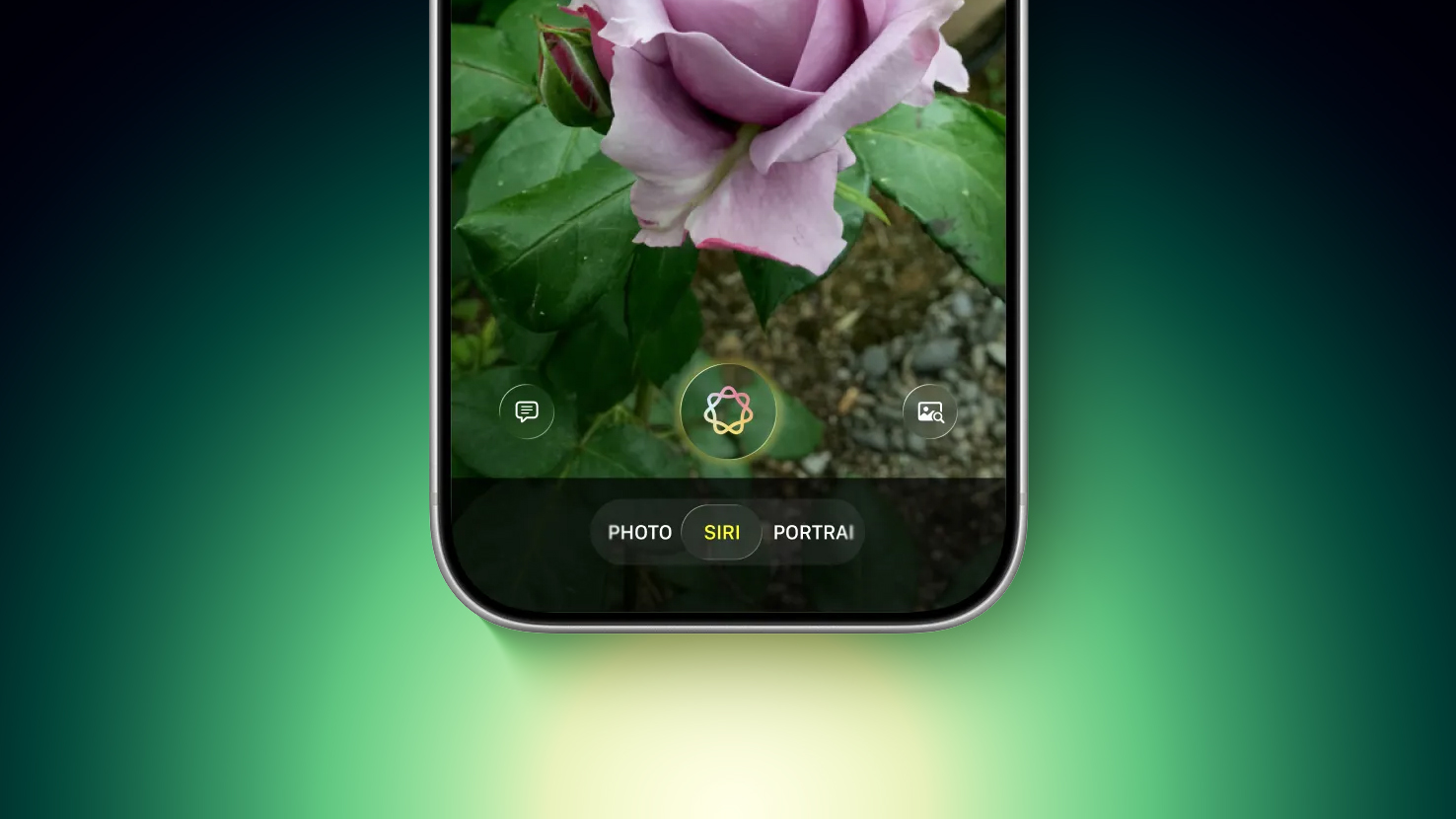 Image via Bloomberg
Siri mode is a renaming of Visual Intelligence, and it will make the feature more visible. Accessing Visual Intelligence in iOS 26 requires users to hold down the Camera Control button or assign the feature to the Action button, and many people may not even know it exists.
Visual Intelligence can identify objects, plants, animals, art, books, and more, searching for whatever the user snaps on Google Image Search. In iOS 27, Siri will be able to answer questions about what a user is looking at, providing information from the web.
Apple is adding new Visual Intelligence capabilities in iOS 27, and they will be available through the Camera app Siri mode.
- Nutrition – Users can scan nutrition labels on food packaging for calorie and macronutrient tracking using the Health app.
- Contacts – Visual Intelligence will let users scan phone numbers and addresses on business cards and other print media, adding the information to the Contacts app.
Apple plans to make the Camera app more customizable in iOS 27. iPhone users will be able to replace the top row of camera shortcuts with options of their choosing, selecting features like flash, exposure, timer, depth of field, photo styles, and resolution.
Camera controls, now labeled as widgets, can be placed at the top of the Camera interface in any order. Users can select widgets from a transparent widget tray that comes up from the bottom of the app and organizes widgets into categories like basic, manual, and settings.
The Camera app will have the same default layout that’s available now with quick tap buttons for flash, Live Photos, and Night Mode, but the customizable widget interface will be added as an advanced layout that will appeal to professional users.
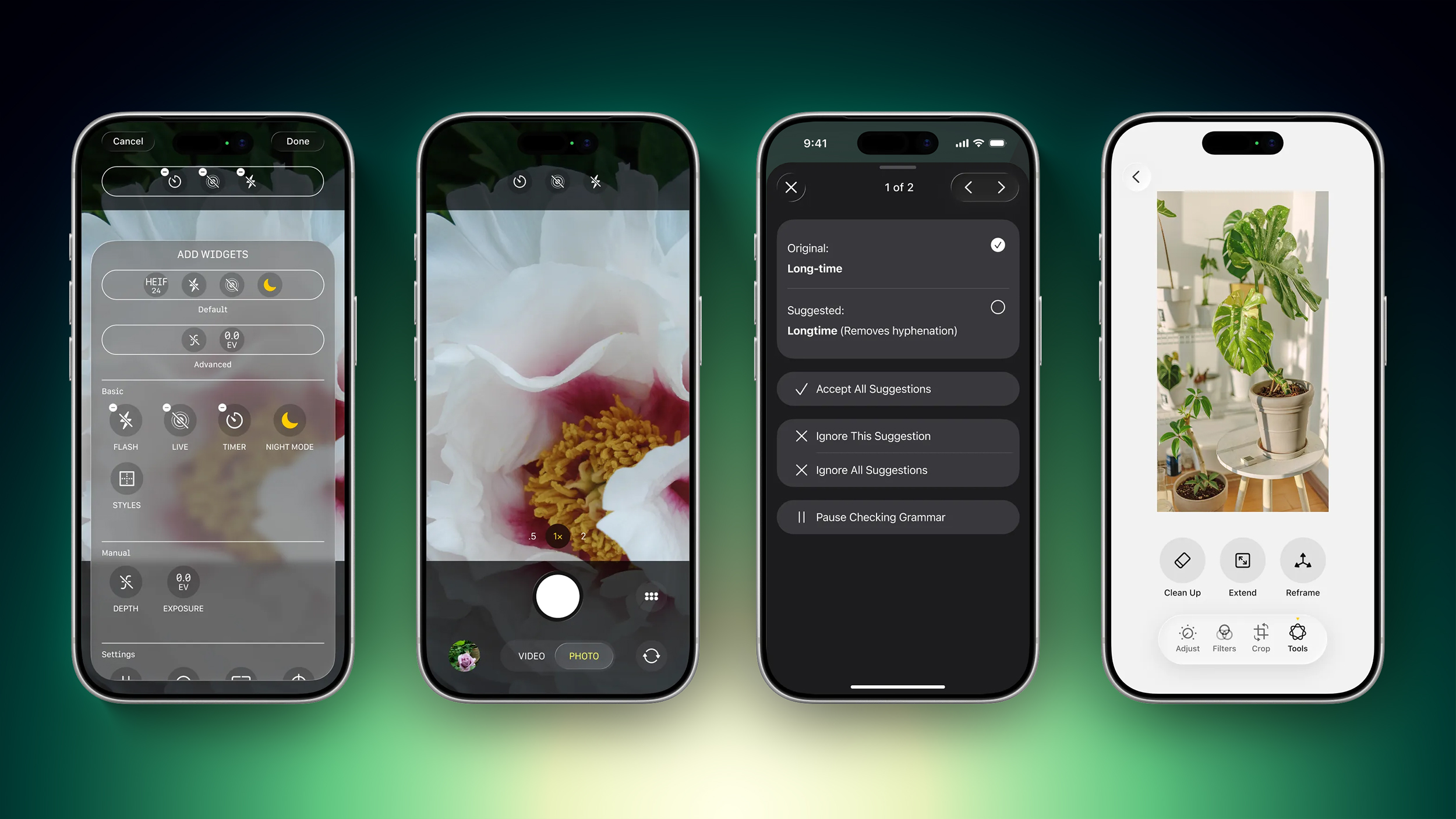 Image via Bloomberg
iPhone users can currently tap on an icon at the top right of the Camera app to access all of the Camera controls, but Apple is moving that view to the right of the shutter button in iOS 27.
The Camera app is also going to get new grid and level options that will join the existing features.
Photos
The Photos app will have an Apple Intelligence Tools section when editing an image with new Extend and Reframe options.
- Extend – Extend generates additional image content beyond the original frame of the photo, filling in scenery when changing the crop of an image. This tool will support expanding the edges of an image with zoom gestures.
- Reframe – When used with spatial photos, Reframe will let users change the perspective of an image after it’s captured.
Apple is also testing an AI photo editing feature that lets users request edits using natural language. Users would be able to tweak color, lighting, cropping, and other image parameters without having to use manual tools. The voice-based photo editing feature may not arrive in the first version of iOS 27.
Shortcuts
The iOS 27 Shortcuts app will support using natural language to create a shortcut with AI. Users will be able to tell Siri what they want to accomplish with a multi-step shortcut, and Siri will generate it.
The Shortcuts app will open with a prompt that says “What do you want your shortcut to do?” with a text field to enter a description. Shortcuts that are created using AI are then automatically installed and immediately available for use.
Wallet
The Wallet app is getting a “Create a Pass” option so users can generate digital passes from scans of physical items like movie tickets, concert passes, and gym membership cards.
Users can tap on the “+” button in the Wallet app and then scan a QR code on a pass or ticket if one is available. If there is no QR code available, there will be an option to create a custom pass.
There are three pass types in Create a Pass, each with a different color. Apple is using purple for events, blue for memberships, and orange for other types of passes. Users can customize images, colors, style, and text on the digital passes.
Apple is also adding an AI bill-splitting feature that will work with Apple Cash. iPhone users will be able to take a photo of a receipt and generate Apple Cash payment requests for different people.
Image Playground and Genmoji
Apple is updating the Image Playground app. The interface for generating a new image has fewer controls and a “describe a change” option for editing images that are created. Previously created images are displayed in a grid with more rounded edges, and instead of a New Image button, there’s a “+” button.
Apple has also been testing new models that produce more lifelike images, so we could see new image generation capabilities in iOS 27 with better image quality.
Genmoji is also getting an update so it will use fewer resources, causing less battery drain and fewer heat problems. Genmoji will be better quality with a new Genmoji model, and a Suggested Genmoji feature will bring up custom emoji ideas based on your media and text history.
Writing Tools
Apple is testing an expanded version of Writing Tools that will do more rewriting and text generation than the current version. There is a “Write with Siri” toggle at the top of the keyboard, along with a “Help Me Write” option that comes up when Siri is activated while a text field is open.
Apple is going to add a dedicated AI grammar checker that will work alongside the current spell check. When writing in Messages, Mail, and other apps there will be a translucent menu that slides up from the bottom of the iPhone’s screen, and it will show suggested revisions next to the original written text.
Users can go through the suggestions and accept or reject them one by one, approve all of the changes at once, or ignore the changes.
Other Features
- Wallpaper – There will be an option to generate custom wallpapers with the Image Playground app, with the feature built into the interface for selecting a new wallpaper.
- Safari – Safari will get an updated start page with four tabs for switching between favorites, bookmarks, Reading List, and history.
- Calendar – Rumors suggest the Calendar app will incorporate new AI features. Siri will also be able to draw on information in the app.
- Health – With a new calorie scanning feature coming to the Camera app, calorie tracking will be more prominent in the Health app. Apple was also planning a Health+ subscription service, and while that’s been scaled back, there could be other AI health app changes.
- Weather – The Weather app will have a new Conditions panel for switching between temperature, rain, and wind from the main interface, without the need to tap into a weather module.
- AirPods settings – The AirPods interface in the Settings app will be simplified, with options featuring better organization. Major features like hearing health will be easier to find.
- AirPlay Alternatives – Apple is adding a feature that will let users beam content to AirPlay alternatives like Google Cast. It could be limited to iPhone users in the EU because it is being implemented as a Digital Markets Act requirement.
System-Wide Design Changes
There are system-wide design changes coming in iOS 27. The separate tab bar in apps like Apple Music, Podcasts, News, and Apple TV will be adjusted to combine search with the other navigation options. Apple separated search in many apps when introducing Liquid Glass, but it’s reverting to the original look.
When using the on-screen keyboard, there’s a new animation that shows the keys sliding up from the bottom of the iPhone interface, and Apple is adding redo and undo controls for easier customization of the Home Screen‘s icon and widget layouts.
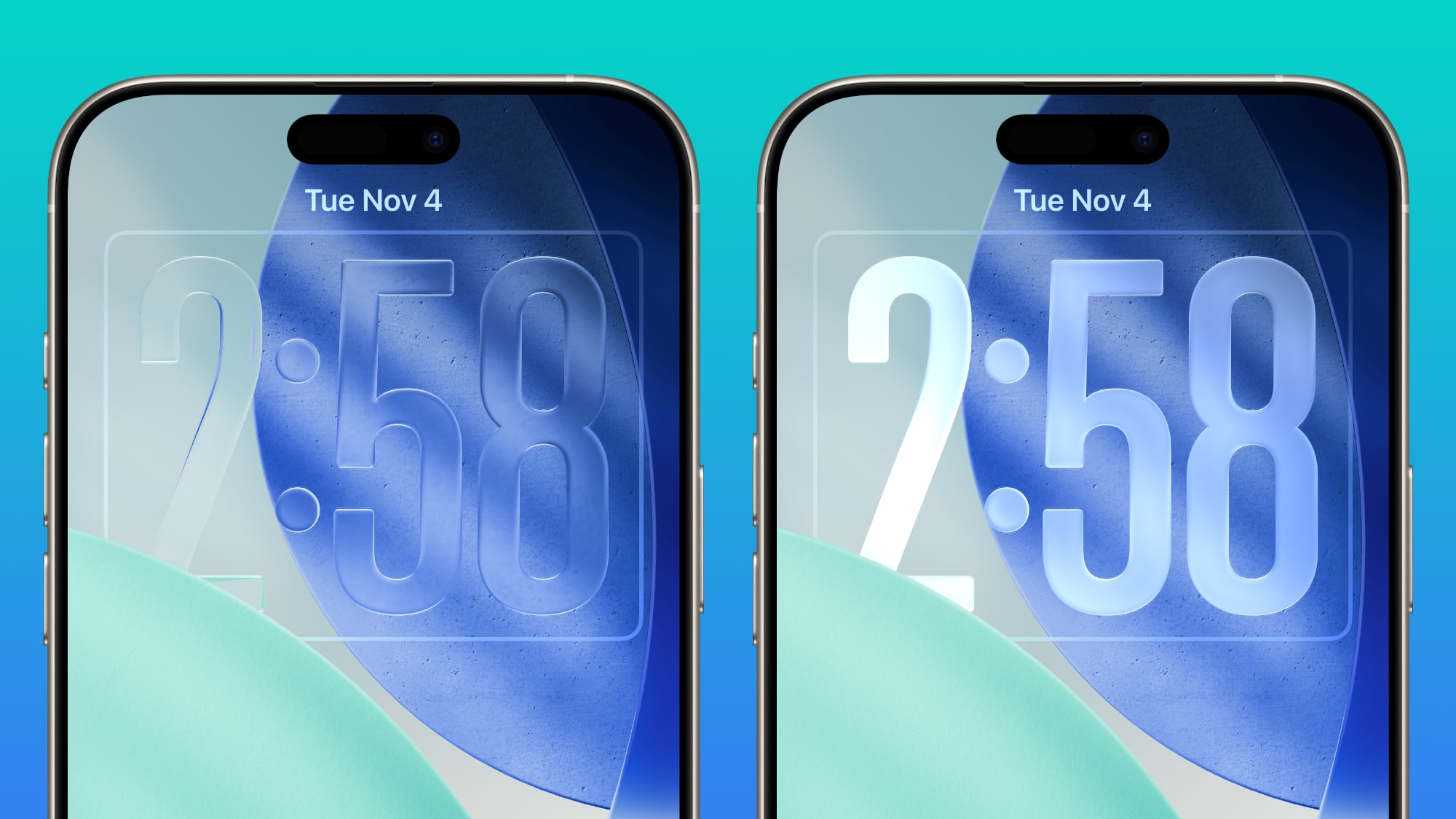
Apple doesn’t plan to make major changes to the Liquid Glass aesthetic in iOS 27, but the company is mulling a system-wide setting that would precisely adjust the look of the interface. In iOS 26.2, Apple added a slider that lets users adjust the opacity of Liquid Glass for the Lock Screen’s clock, and that setting could be expanded to the entire operating system.
Foldable iPhone Interface
The first foldable iPhone will be introduced in September. Rumors suggest that it will feature a 5.5-inch display when folded, and a 7.8-inch display when it’s opened up like a book.
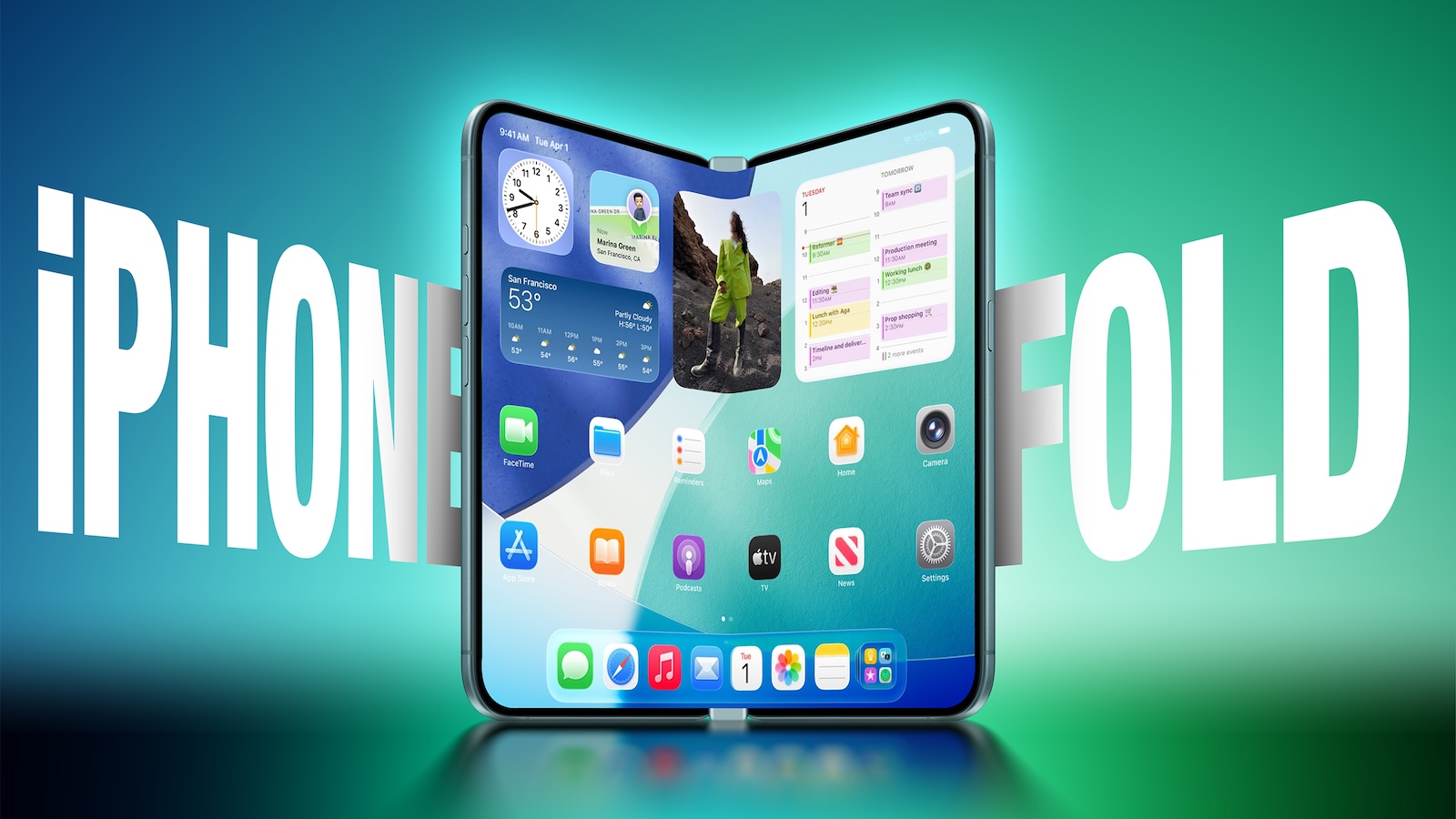
An iPhone with a larger display will require major updates to iOS, and iOS 27 will focus on building new interfaces and experiences made for a larger smartphone display.
The iPhone Fold will operate like a cross between an iPhone and an iPad, but it will run iOS, not iPadOS, and it won’t support iPad apps. When unfolded, the iPhone will have an iPad-like layout that supports multitasking with two apps side-by-side. Many of Apple’s iPhone apps will have sidebars on the left of the display, with Apple providing developers with tools to easily adapt their apps to the new layout.
Apple is using a wider design for the iPhone Fold than most foldable smartphone makers have used, and it is rumored to have an iPad-like 4:3 aspect ratio. When the iPhone is closed, it will have a standard iPhone layout that looks like the version of iOS we have now.
Satellite Features
Apple is working on several new satellite features for the iPhone, and it’s possible some features could be introduced as soon as 2027.
- Apple Maps via satellite
- Photos in Messages via satellite
- Satellite API framework for third-party apps
- Satellite over 5G
- Satellite connectivity without the need for a view of the sky
Performance and Stability
Bloomberg‘s Mark Gurman has described iOS 27 as a “Snow Leopard” update, suggesting that Apple will focus on improving underlying performance and quality.
Apple is prioritizing cleaning up the iOS code and removing anything that’s outdated, which could mean upgrading apps to improve performance and rewriting some existing features to be more efficient. The code updates could provide a more responsive, faster version of iOS.
Apple is also aiming for efficiency improvements that could translate into tangible battery life gains.
Launch Date
Apple will preview the new iOS features at its WWDC 2026 keynote event on June 8. Developers will get access the same day, and a public beta will likely be available in July. iOS 27 will launch in September alongside new iPhones.
This article, “iOS 27: All the Rumored App Features” first appeared on MacRumors.com
Discuss this article in our forums