
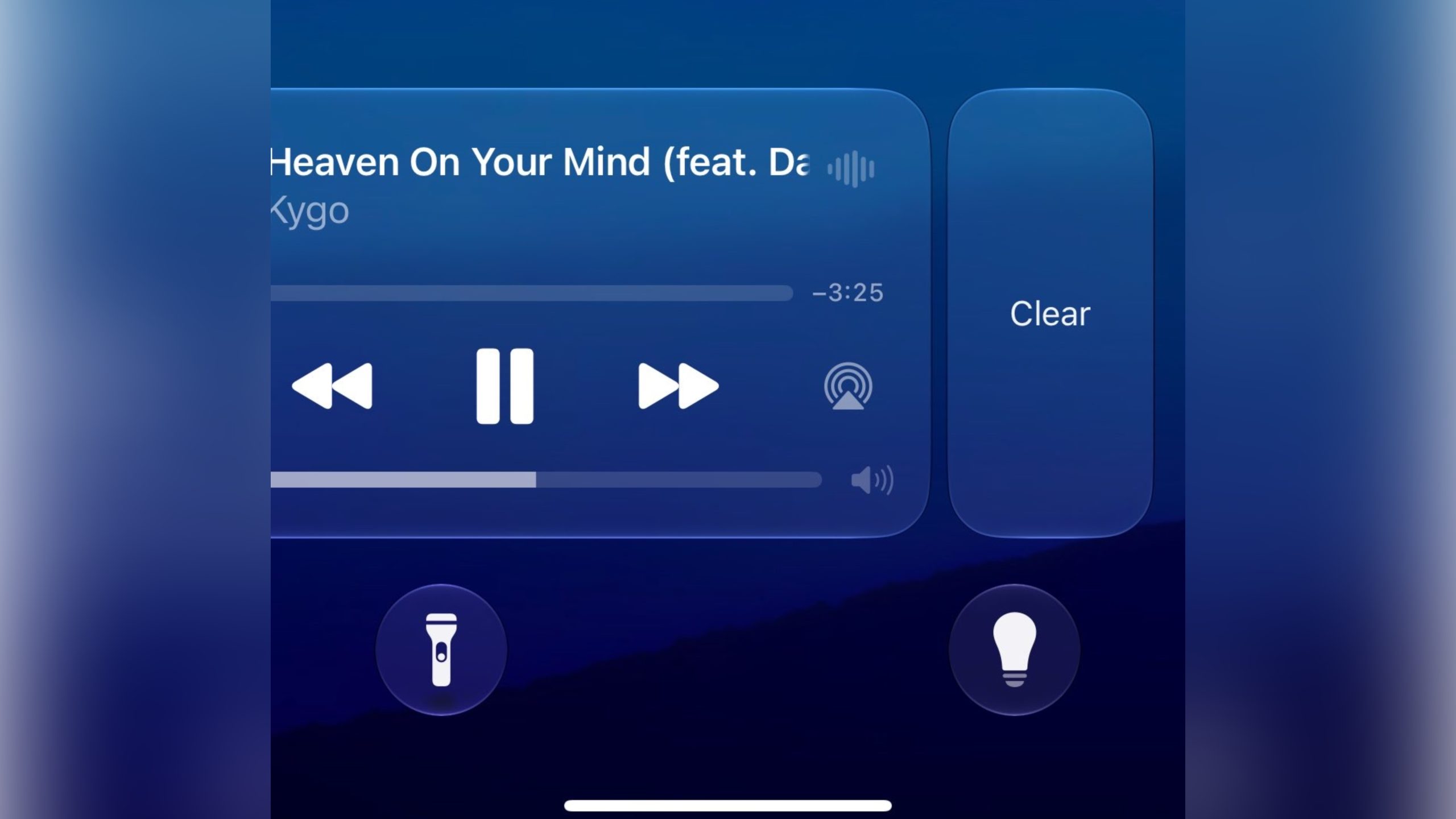
Previously, there was no way to dismiss the Now Playing interface on the Lock Screen. But in the first iOS 27 developer build released yesterday, a leftward swipe on the playback controls slides in a Clear button from the right.
Clearing the controls from the screen also removes the smaller Now Playing widget from the Dynamic Island.
It’s not quite clear yet how to bring the widgets back immediately – as 9to5Mac notes, the only workaround appears to be pausing whatever’s playing, waiting a few minutes, and then resuming it. It also seems to depend on which app you’re using for playback. For example, switching from a podcast to video playback re-invokes the Lock Screen widget.
New in iOS 27: You can now swipe away the now playing controls on the lock screen.
Unclear how to get it back at the moment pic.twitter.com/NuEbyiHgok
— Aaron (@aaronp613) June 8, 2026
Being able to make the Now Playing widget go away is admittedly a small tweak, but it will be welcomed by anyone who likes to dismiss whatever is taking up space on their Lock Screen, playback controls included. Apple will make iOS 27 available in public beta next month, with a general release expected in the fall.
This article, “iOS 27 Lets You Dismiss the ‘Now Playing’ Lock Screen Widget” first appeared on MacRumors.com
Discuss this article in our forums